
Message Board Help:
[Click here for contact information]
Like anything based on new technology, you will need to put on your thinking cap for a few minutes to acquaint yourself with this message board. Once you master these few points you should have no problem being an active participant in this fun and free service.
-
Register - When you get to the message board for the first time, you can start reading right away, but you are not logged in.
[Oops! Policy changed: You must now log in even to view the message board. I did this to compel users to make sure they were logged in. If I get complaints I can change this back but many people were getting frustrated about using the board when the only problem was that they were not logged in.]
Here is where most people get confused. Curious browsers of the Internet can certainly read the messages we've posted (to a point). However, they cannot post messages, nor can they see two vital areas of the message board. (They cannot see the "Prepsters List" where you can post contact info for other Prepsters to see, nor can they see our "Members" area where you find a complete list of all message board members.
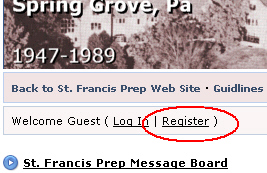
On the message board, you will see a link at the top where you can register. The registration process is quick and easy, and most importantly, the information collected is not used for any commercial purpose! Answer all fields there, and at one point you will need to input a Security Code to show that you are a real person and not some Internet "web-bot".
Important! You will be asked for your e-mail address. You must supply a real e-mail address because the system will send you a confirmation e-mail that you will need to reply to. (This is an automatic procedure to make sure troublemakers don't infiltrate the message board. And no, this does not put your e-mail address on any kind of junk e-mail database!). If you do not complete this procedure, your account can not be activated! Please look for this e-mail and follow the instructions within. Make sure it didn't go into your Junk mail folder, and e-mail me if you have problems.
-
Log In - Once you complete the procedure above, you will then be allowed to log onto the board and participate fully. After inputting your user id and password, you should never need to log on again because of a technology known as "cookies" that are left on your computer by this site. BUT... if you should delete your cookies, or try to sign on from another computer, you will need to remember your user is and password.
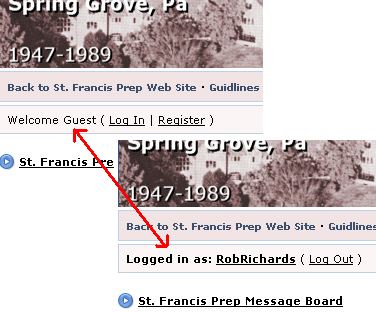
! Many people make the mistake of not knowing whether they are logged in or logged out. If some message board functions are not available anymore, you are most likely logged out.
-
Browsing - There are several areas to browse. Click around and read all you like. There are two areas we would like you to look at first.
-
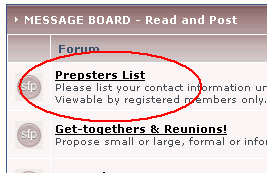
The Prepsters List - If you're logged on, you will see the Prepsters List. Find your class year there and post some small amount of info on yourself and let us know you were here.
-
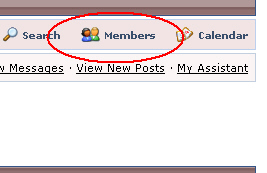
Members Area - In the upper-right corner on the message board, you will see two links.
-
Members - you can see a list of all board members.
-
My Controls - a lot of stuff in there, but look for Edit Profile Info to change information about you that other members can see.
-
-
-
Posting - The read-only news area is for viewing only, but you can post freely in the message board area.
-
New Topic - Starts a new topic to throw out to everybody and to generate replies, if any.
-
New Poll - In some areas you can submit a question that others can vote on. (It's pretty straight forward and easy to figure out).
-
Add Reply - You'll get the hang of it, but once you are viewing someone else's Topic, you can respond to is by clicking on Add Reply.
-
There are more functions on the message board for you to discover, so utilize them as you find them. If you have any questions on any function, let me know.